
In this guide 6 sections
Mobile access options
Players usually expect one of three ways to play on a phone. The table shows which of them the casino supports and what a visitor finds in the App Store and Google Play compared with the browser version.
| Option | Status |
|---|---|
| App Store (iPhone) | No casino app published |
| Google Play or APK | No file from the operator |
| Mobile browser site | Full version on iOS and Android |
| Home screen shortcut | Possible through the browser menu |
| Account and bonuses | Shared with the desktop site |
Downloads presented as a blitzbet casino app on other websites do not come from the operator and are not needed. All features reviewed here, from the cashier to live support, work in Safari, Chrome and other current browsers.
Mobile layout and menu
On a phone the header keeps only the logo and the Sign up and Sign in buttons, while a fixed bar at the bottom holds Menu, Casino, Create Account, Promo and Search. The banner carousel and the game tiles are resized for narrow screens.
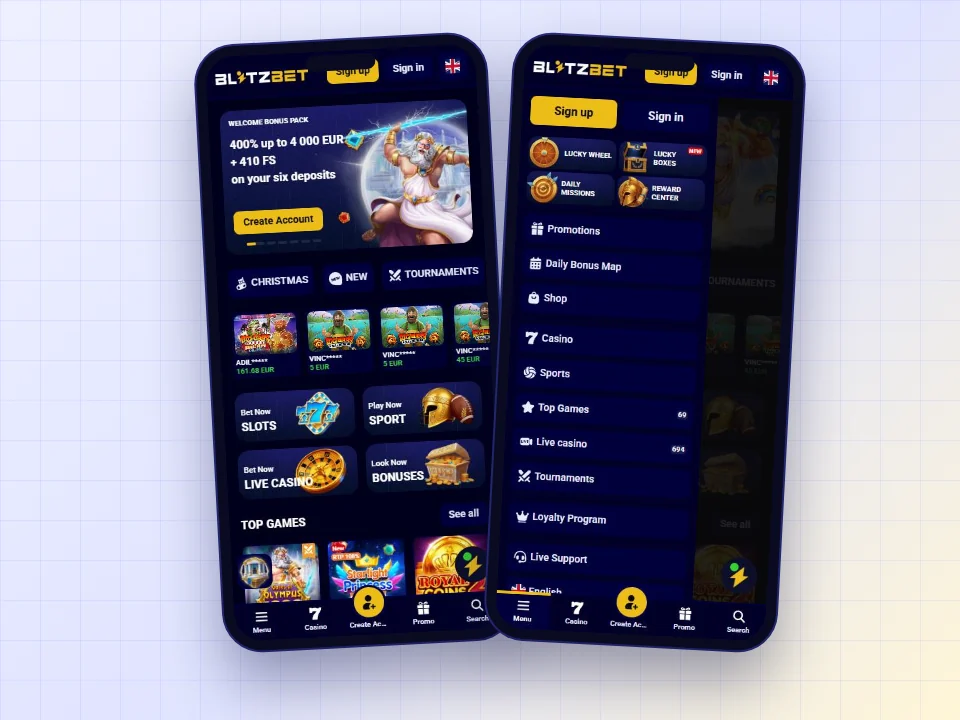
The side menu opens from the bottom bar and lists Lucky Wheel, Lucky Boxes, daily missions, the Reward Center, promotions, the shop, casino, sports, tournaments and the loyalty programme, with live support at the end.

Adding a home screen shortcut
Without a store app, a shortcut on the home screen is the quickest way to open the casino. The site publishes a web manifest, so modern browsers can place an icon that starts the casino in its own window without the address bar.
- Open the casino in Safari on an iPhone or in Chrome on Android and wait until the home page with the banner carousel and the game tiles has finished loading.
- In Safari, tap the Share button in the bottom toolbar; in Chrome, open the menu with three dots in the upper right corner of the browser window.
- Select Add to Home Screen; Chrome can also offer Install app, which creates the same kind of icon based on the web manifest of the casino website.
- Confirm the suggested name or enter your own and press Add; the icon appears on the home screen next to the apps already installed on the phone.
- Start the casino from the new icon and sign in once; the browser can keep the session, so the next start may open straight in the player account.
The shortcut takes no storage space and always opens the current version of the site, so updates are never needed. For a player looking for a blitzbet app, it covers the same everyday use as an installed application on iOS and Android.
Signing in on a phone
The mobile sign-in form fills the whole screen and keeps the same elements as on desktop: Login or Email and Password, the yellow Sign in button, the Forgot password? link and the Google and Twitch icons.
- The password manager of the phone can save the details after the first sign-in, which is convenient on a personal device but not on a shared one.
- Social login on a phone opens a Google or Twitch confirmation page, and the account chosen there must be the one that was used during registration.
- A stable connection matters more for live tables than for the sign-in itself, because a lost signal can interrupt the round that is being played.
- News about promotions arrives by e-mail if the promotions checkbox was left ticked at registration, and it is also shown in the profile of the account.
- On a shared phone, signing out through the profile menu after each session prevents the browser from keeping the account open for the next person.
If the phone asks for the password at every visit, the browser is probably deleting cookies when it closes. Allowing cookies for the casino or opening it from the home screen icon keeps the session between visits.
Troubleshooting on mobile
The browser version runs on current iPhones and Android phones. When the blitzbet casino app experience in the browser looks broken, outdated software is the usual reason, and the typical cases below have simple solutions.
| Problem | Solution |
|---|---|
| Page without images or styles | Clear the browser cache for the site and reload |
| Game does not open | Allow pop-ups for the casino site |
| Live stream pauses | Turn off power saving and keep the screen on |
| Sign-in window does not react | Update the browser or open a private tab |
| Session ends after closing | Allow cookies for the casino site |
When a problem remains, live chat can check the account and the device details. A screenshot of the error and the version of the browser help the agent find the cause more quickly than a written description alone.
Questions and answers
Is there an app in the App Store or Google Play?
No. The casino does not publish a store application; the mobile website runs in the browser of the phone.
What is in the bottom bar of the mobile site?
Menu, Casino, Create Account, Promo and Search.
Can I sign in with Google on a phone?
Yes. The Google and Twitch icons are shown under the mobile sign-in form.
How do I add the casino to the home screen?
Safari: Share → Add to Home Screen. Chrome: three-dot menu → Add to Home Screen or Install app.
