
Walkthrough contents 6 parts
Mobile routes to the casino
There are three ways players in the Netherlands usually expect to reach a casino on a phone. The table shows which one is actually offered and what turns up when searching the App Store or Google Play.
| Route | Available |
|---|---|
| App Store for iPhone | No casino app |
| Google Play or APK | No file from the operator |
| Mobile website | Yes, iOS and Android |
| Home screen icon | Yes, through the browser menu |
| Same account and bonuses | Yes |
Files promoted as a blitzbet casino app elsewhere are not published by the operator and serve no purpose. Every feature described here, from deposits to live chat, already runs in Safari, Chrome and other recent browsers.
Mobile screens and menu
On a smartphone the top bar holds only the logo and the Sign up and Sign in buttons, and a fixed bar at the bottom offers Menu, Casino, Create Account, Promo and Search. Banners and game tiles are scaled down to fit the narrow screen.
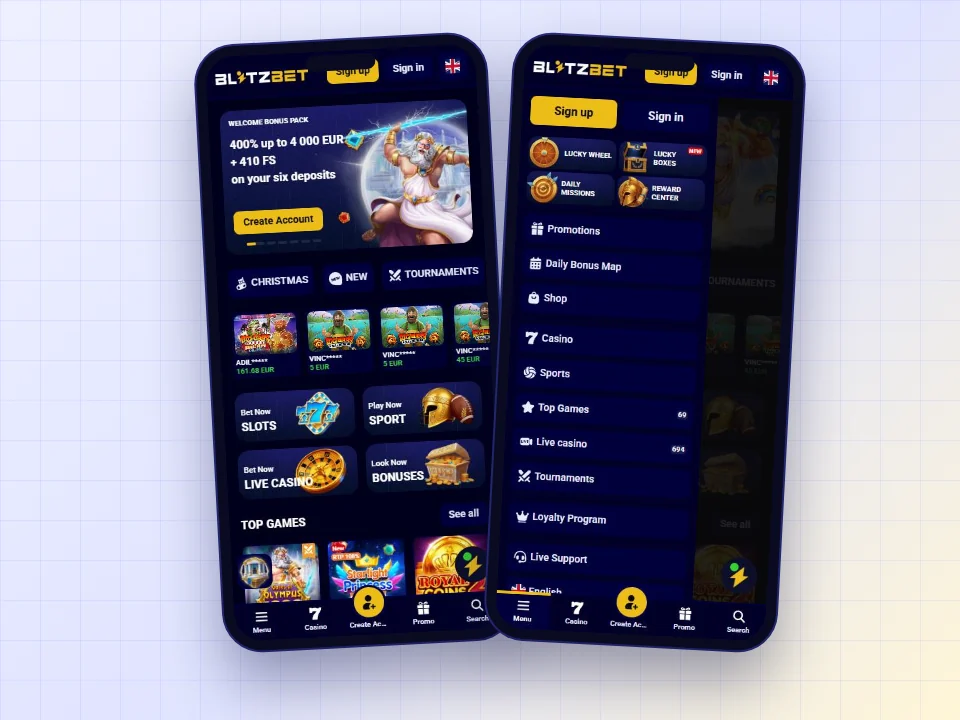
Tapping Menu opens a panel with Lucky Wheel, Lucky Boxes, daily missions, the Reward Center, promotions, the shop, casino, sports, tournaments and the loyalty programme, followed by live support at the bottom.

Creating a home screen icon
Since there is no store app, a home screen icon is the fastest way back to the casino. The website includes a web manifest, which allows current browsers to add an icon that opens the casino without an address bar.
- Visit the casino in Safari on an iPhone or in Chrome on an Android phone and let the start page with the banner slider finish loading completely.
- In Safari press the Share button at the bottom; in Chrome tap the small three-dot menu that sits in the upper right corner of the browser window.
- Choose Add to Home Screen; Chrome may show Install app instead, which builds the same kind of icon from the web manifest of the casino site.
- Keep the proposed name or type another one and press Add; the icon is then placed on the home screen alongside the other apps on the phone.
- Open the casino from the icon and log in once; because the browser can remember the session, the next launch may go directly to the account.
The icon uses no storage and always loads the newest version of the site, so there is nothing to update. For people looking for a blitzbet app, it does the same everyday job as an installed application on iPhone and Android.
Logging in on your phone
On a phone the login form takes up the full screen but contains the same elements as on a computer: Login or Email, Password, the yellow Sign in button, Forgot password? and the Google and Twitch icons.
- A password manager on the phone can store the login details after the first visit, which is handy on a personal phone but unwise on a shared one.
- Google or Twitch login on a phone opens a confirmation page of that service, and the account selected there must match the one used at sign-up.
- A steady connection is more important at live tables than during login, since a dropped signal can cut off the betting round that is in progress.
- News about deals reaches the player by e-mail when the promotions box stayed ticked at sign-up, and it also appears inside the account profile.
- On a phone used by others, logging out through the profile menu after playing stops the browser from leaving the account open for the next user.
When the password is requested on every visit, the browser is probably removing cookies when it closes. Allowing cookies for the casino or starting it from the home screen icon keeps the session alive.
Fixing problems on a phone
Current iPhones and Android phones run the mobile site smoothly. If the blitzbet casino app experience in a browser seems broken, old software is usually to blame, and the situations below come with easy fixes.
| Symptom | Fix |
|---|---|
| No images or layout | Clear the site cache and reload the page |
| Game will not start | Allow pop-ups for the casino website |
| Live video freezes | Disable battery saving and keep the screen awake |
| Login pop-up is unresponsive | Update the browser or try a private tab |
| Logged out after closing | Allow cookies for the casino website |
If nothing works, live chat can look at the account and the device data. A screenshot of the problem plus the browser version usually leads to a faster answer than a text description on its own.
Short answers
Is there a download in the app stores?
No. There is no app in the App Store or Google Play; the mobile site works in the phone browser.
What does the bottom bar contain?
Menu, Casino, Create Account, Promo and Search.
Does Google login work on a phone?
Yes, the Google and Twitch icons appear under the mobile login form.
How do I make a home screen icon?
Safari: Share → Add to Home Screen. Chrome: three-dot menu → Add to Home Screen or Install app.
